Google Antigravity Swarms: when AI agents work as a team

Ask one AI agent to research, write, test and coordinate a complex project and it can become a bottleneck. Google Antigravity Swarms takes a different approach: a coordinator divides work among agents, which report their progress on a shared board.
The interesting question is not simply how many agents can run at once. It is whether the work is divided cleanly, whether agents can challenge one another, and whether a person can still see and control what happens.
What is an Antigravity swarm?
Google describes Swarm as a preview feature in the Antigravity app and command-line interface. A user starts with /swarm and a task. The current conversation becomes a coordinator that assigns work to named agents, tracks their reports and combines the results. Google says workers communicate through a shared message board, and that a verifier usually checks the work of a small group of workers.
Each worker starts with its own conversation and a brief defining its responsibility. By default, workers use the conversation’s model and share its workspace; Google says an available different model or separate working copies can be requested. An agent working on a different model is not automatically an independent expert, and a verification agent can still make mistakes.
More than a row of chat windows
Running several conversations side by side leaves the person coordinating the handoffs. A swarm adds a shared record of assignments, questions, reports and checks. Google’s app offers a board, a member view and a graph of interactions; the CLI offers a live board too.
That visibility does not make the output correct. The board shows what agents reported, not proof that a source was read accurately, a file was rendered properly or a test covered the real problem. Review the evidence behind the report.
A creative production swarm: our test design
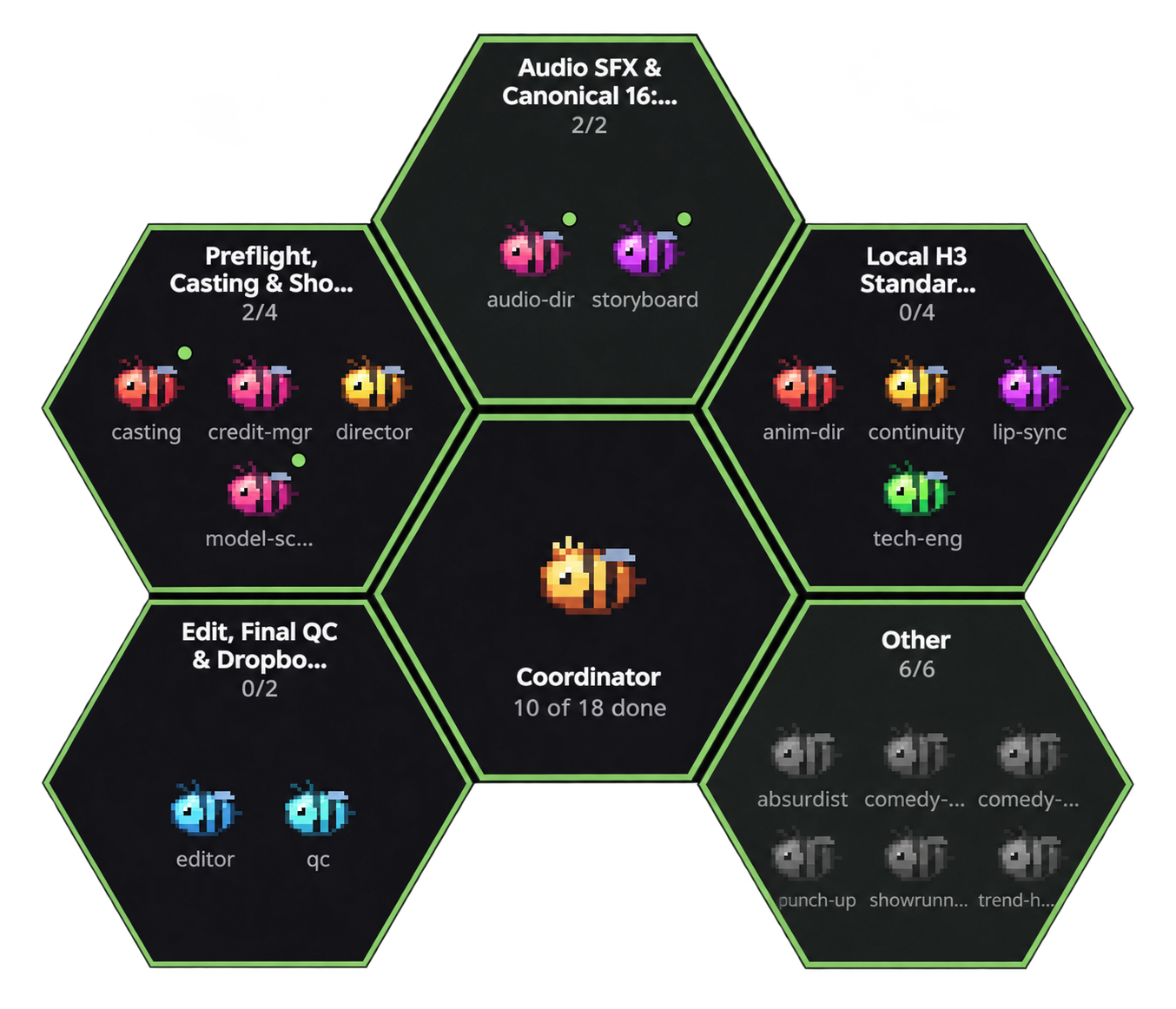
We are exploring an Antigravity swarm as a creative production team. The test design starts with a writers’ room: separate agents research topical material, propose ideas, challenge weak concepts and refine the strongest scripts. A coordinator brings the candidates together for a person to select before production begins.
After selection, the proposed production team divides the work between direction, storyboarding, audio, animation, continuity, editing and quality control. A technical role checks available tools, while another tracks paid service usage separately from local processing. The aim is to test whether specialised roles and explicit handoffs help a small team develop a finished short, rather than just a collection of generated clips.
The instructions call for shared references, a shot manifest, review of character and scene consistency, and targeted repairs when a clip fails. They also require a human decision before production and record creative decisions and approvals. Planning can run in parallel, but jobs that compete for one graphics processor should be queued.
These are the test’s instructions and intended workflow. Reviewing the setup and agent definitions does not establish that every role, integration or quality check has run successfully, or that a finished production is complete. We have not measured a speed advantage or compared the outcome against a single agent. We will need actual run records and reviewed outputs to assess those claims.
Handoffs are the real work
A useful creative handoff identifies the chosen brief, files to use, responsible agent, desired output and conditions for acceptance. A shot manifest might record a scene description, reference assets, intended duration and the version awaiting review. This is a design recommendation, not a built-in guarantee.
Give each agent a specific scope. One worker can research visual options while another checks technical compatibility; neither should silently replace approved references or overwrite another worker’s files. For shared documents, a single writer or controlled queue can reduce conflicting edits. Record decisions and versions so a human can understand why the team changed direction.
Where the limits appear
Quota and cost. Google notes that each worker is an agent and a swarm can consume quota faster than one conversation. Availability, usage limits and billing can change by plan and account, so check the current product information before starting a large job. Google says idle workers waiting on the board do not use tokens; active work still consumes resources.
Access and safety. Multiple agents can multiply the impact of broad permissions. Antigravity documents allow, ask and deny controls, alongside different execution settings. Configure them for the environment and review requests involving external services, sensitive files, spending and publication. An instruction to be careful does not replace access controls. See Google’s permissions documentation.
Quality and disagreement. A critic can spot problems a writer misses, but agents can repeat one another’s errors or agree too readily. Ask reviewers for specific evidence and meaningful objections, then make the final editorial decision yourself. A source check should follow the original source, not merely repeat another agent’s summary.
Operational friction. Parallel jobs can contend for memory, graphics hardware or the same file. A team that launches more workers than the machine or task can support may become slower, costlier and harder to follow. Start small, give workers distinct responsibilities, and add parallelism only where it helps.
A practical starting brief
Try a low-risk task first: ask a swarm to research a subject, develop alternatives and have another agent challenge them. Define the scope, require links to primary sources, specify which files each worker may change and ask the coordinator to stop for a human choice before any external action. Review the board and the actual source material before using the result.
A well-run swarm can make complex work easier to organise. People still set the goal, choose the trade-offs and decide what is ready to share.
Sources and method
- Google Antigravity: Swarm — coordinator, workers, workspaces, board and preview limits.
- Google Antigravity: Custom subagents — subagent configuration and lifecycle.
- Google Antigravity: Agent permissions — permission controls and execution settings.
Methodology: Documentation research checked on 22 November 2026. The creative case study describes our test setup and intended workflow; the reviewed instructions and agent definitions are not evidence that every production step succeeded. We did not run a comparative swarm benchmark or independently test product behaviour for this article. AI tools assisted research and drafting; editorial decisions remain subject to human review.